Most offices notice the same three things about their printing sooner or later. Pages sit unclaimed in the output tray, nobody can say which team prints the most, and someone in IT still looks after a print server that nobody else thinks about. Print management software deals with all three, and some versions now need no server at all.
Print management software is the layer between the people who print and the printers they use. It decides who can print what, holds each job until the right person collects it, and records every page so you can see where the cost goes.
This guide explains how it works, how the products we support differ, and how to tell whether your office needs one. Our software page shows the full range.
Key takeaways
- Print management software controls who prints, holds jobs until release and reports every page by user.
- Secure release stops confidential pages sitting in the output tray for anyone to pick up.
- The main difference between products is where they run: your server, the vendor's cloud or the printer.
- Serverless options remove the print server your IT team would otherwise patch and back up.
- Offices with shared printers, personal data or department budgets gain the most.
What is print management software?
Print management software is a program that controls and records printing across an office. Staff sign in before their pages print, so every job is tied to a person. It applies rules such as double-sided or mono by default, holds jobs until they are released, and reports usage by user, device and department.
It does three jobs. The first is control: rules you set once, such as double-sided by default, colour only for the teams that need it, or a quota for a department. Automatic conversion to mono is one of the simplest rules, and on qualifying jobs it can save up to 90%, as the PaperCut pages on our site set out.
The second is security. Without it, a printed payslip or contract sits in the tray until someone picks it up. With secure release, the job waits until its owner is at the machine.
The third is visibility. Every page is tied to a signed-in user, so you can see what is printed, by whom, on which device and at what cost.
How does it work day to day?
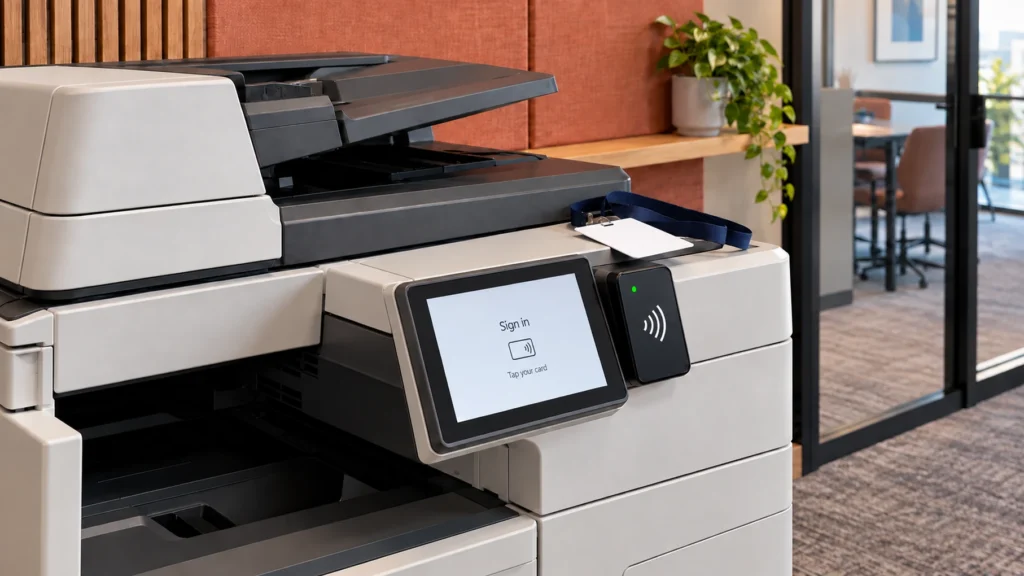
When someone prints, the job goes to a held queue instead of straight to the printer. The person then signs in at a connected device with an ID card, a PIN code or a phone app, and their pages print there. Behind the scenes, the software logs who printed what, where, in colour or mono, and how many pages.
Once jobs wait in a queue, staff can collect them from whichever device is nearest, often called find-me printing. Our earlier piece on find-me printing and how it works covers the idea in more detail.
The held queue matters because unattended pages are still a common route for data to leak. Quocirca's 2026 print security research, a survey of 400 IT decision-makers in the UK, France, Germany and the US, found that 67% of organisations had at least one print-related data loss in the past year, up from 56% in 2025. Our guide to secure printing for finance and legal firms covers the security side in more depth.
The last part is reporting: usage by user, device and department in one console, often with device status and toner levels alongside.
Source: Quocirca's 2026 print security research, a survey of 400 IT decision-makers in the UK, France, Germany and the US, published 28 Jul 2026.
Self-hosted, cloud or on the printer: how the options differ
The main practical difference between products is where the software runs. Some run on a server you host, on your own premises or in your private cloud. Some are hosted by the vendor, with no server for you to run. Some run on the printers themselves. The right fit depends on your IT setup and your fleet.
A self-hosted product keeps everything on your own infrastructure, configured and maintained by your IT team. That suits organisations with their own IT staff, strict rules about where data sits, or complex sites that need deeper customisation.
A cloud-hosted product moves the queues, rules and reporting to the vendor's platform, with no print server to patch, back up or license. That suits organisations that want less to maintain, staff who work from home, or several sites that need one set of rules.
On-device software runs inside the printers, so there is no separate server or cloud service to manage. It is built for one manufacturer's devices, which makes it a natural fit for a single-brand fleet.
| Product | How it runs | Where it fits | How staff release jobs |
|---|---|---|---|
| PaperCut MF | On your own server or private cloud | Teams that keep it on their own servers, on Windows, Mac or Linux | At the device, after signing in |
| PaperCut Hive | No print server required | Teams that want nothing to host or maintain | At the machine, on a computer or from a phone |
| Tungsten Printix | Cloud queues, with no print server | Teams that sign in with Microsoft or Google accounts, in the office or at home | App, ID badge or code |
| Epson Print Admin | On a Windows server, or on each device | Fleets of Epson business inkjets | ID card, login or PIN code |
PaperCut MF
PaperCut MF is PaperCut's self-hosted option. It runs on premise or in your own private cloud and covers print, scan and fax, with secure release, user authentication and detailed reporting across Windows, Mac and Linux. It suits an organisation that wants print management on its own infrastructure, or a larger site that needs more customisation.
PaperCut Hive
PaperCut Hive is fully hosted and serverless, so there is no print server to run or maintain. Staff print from any device to a single queue and release the job at the machine, on a computer or from a phone. It is subscription based and scales with your organisation.
Tungsten Printix
Tungsten Printix is a cloud print management platform in its own right. Print queues and drivers live in the cloud and deploy themselves to each computer, and people sign in with the accounts they already use through Microsoft Entra ID, Google Workspace, Okta or OneLogin. It also includes Printix Capture for scanning and a feed into Power BI.
Epson Print Admin
Epson Print Admin is Epson's own print management for its business inkjet devices, and a big part of how we run Epson estates. The standard edition runs on a Windows server, while the serverless edition runs on each device and holds jobs until their owner signs in. Epson describes both editions on its Epson Print Admin page, and our Epson partner page covers the devices.
None of these four is a step up from the others. Each answers a different setup, which is why we support all four.
What about scanning and document management?
Where the bigger problem is paperwork rather than printing, two other products we support are a closer fit. Ricoh Smart Integration turns a Ricoh multifunction printer with a smart operation panel into a scan-to-cloud workstation, with text recognition in 19 European languages, and its standard package is free. DocuWare captures, stores and automates documents so your team can reach them securely from any device, with an audit trail on every file.
Does your office need it?
You probably need it if several people share each printer, if you print personal or confidential information, or if you need to know what each team spends. A very small office with one printer and a handful of staff can often manage without it, though secure release still helps wherever confidential pages are printed.
These are the common signs that it would help:
- Pages pile up uncollected in the output tray.
- You print personal data covered by UK GDPR, such as HR, client or patient records.
- Departments or clients are recharged for printing.
- Staff print from home or across several sites.
- A print server needs patching, backing up and licensing.
The data protection point deserves a closer look. The ICO's guide to data security says UK GDPR requires a level of security appropriate to the risks of your processing, and it names lost hard-copy records among those risks. Secure release and a user audit trail are practical ways to show you have thought about printed personal data.
Cost is the other side: once every page is tied to a person, waste such as colour where mono would do becomes visible. If you want that picture across your whole fleet first, our print management services start by measuring how your printers are actually used.
Choosing the right setup for your office
The right choice starts with your setup rather than a product name. Do you want to host the software yourself, or have nothing to run? Which accounts do your staff already sign in with? Do your printers come from one manufacturer or several?
Insight Systems has supplied and supported office print since 2003, and we are a partner for every print management product in this guide. That lets us recommend from the way you work rather than from a single brand. Talk to our team and we will walk you through the options that fit, with a free demo of any of them.
Frequently asked questions
It is usually worth it once several people share a printer or you print anything confidential. Secure release stops sensitive pages sitting in the tray, and default rules such as mono and double-sided cut waste from the first day. Cloud-hosted options suit smaller offices because there is no server to maintain. A single person with a desktop printer is unlikely to need it.
Many products work across mixed fleets, and PaperCut Hive, for example, works with printers and all multifunction devices. Others are built for one manufacturer: Epson Print Admin is designed for Epson's business inkjet range. Check your models are supported before you choose, particularly older devices, which may lack the panel or card reader that sign-in needs.
Secure print release holds a print job in a queue until its owner signs in at a printer to collect it, usually by tapping an ID card, entering a PIN code or using a phone app. Nothing prints until the right person is at the machine, so confidential pages never sit unattended in the tray. Jobs that are never collected never print, which also saves paper and toner.
Not necessarily. Self-hosted products such as PaperCut MF run on a server you manage, on premise or in your private cloud. Cloud platforms such as PaperCut Hive and Tungsten Printix need no print server, because the queues and drivers live in the cloud, and Epson Print Admin Serverless runs on the printers themselves. The right route depends on your IT setup.
Tell us how your team prints, which accounts people sign in with and which printers you run. We will show you the print management options that fit, with a free demo and no obligation.
Talk to Us About Print Software