Most offices find out a printer needs toner when the pages come out pale. Someone orders a cartridge in a hurry, often at retail price, or the stationery cupboard fills with spares paid for months early. Then, once a quarter, somebody walks round the building writing down meter readings for the bill.
Automated print monitoring takes those jobs away. It is software that reads each printer's page counts, toner levels and fault alerts over your network and sends them to your print provider. Toner then ships, and faults get picked up, without anyone asking. It is one of the working parts of managed print services, and this guide explains how it works.
Key takeaways
- Networked printers report their own toner levels, page counts and faults, so nobody checks or orders by hand.
- Automatic toner replenishment sends a cartridge as the old one runs low, so it arrives before you run out.
- Manufacturers say device monitoring reads counters and alerts, never the content of what you print or scan.
- Insight's Kent service centre fixes about a quarter of faults remotely, with no engineer visit.
- Reports on who prints what come from print management software, and staff should be told about them.
What is automated print monitoring?
Automated print monitoring is a small program, built into the device or running on one networked PC, that reads each machine's supply levels, page counts and alerts. It sends them to your provider, whose systems act on them: shipping toner, billing from real page counts and flagging faults before anyone calls.
People use "print monitoring" for two different things. Device monitoring is run by your provider and watches the machines: toner left, pages printed and anything gone wrong. Usage reporting comes from print management software such as PaperCut MF and watches the printing: who printed what, where, and for which department.
Both draw on readings that networked printers already keep: a lifetime page count, the level of each supply and a list of active alerts. The Printer MIB standard from the Internet Engineering Task Force sets out how printers store them, so one piece of software can read many brands. Usage reporting is growing too. A Quocirca survey of 560 IT decision makers in the UK, France, Germany and the US (Nov 2025) found print management tool use up from 32% to 45%.
How does automatic toner replenishment work?
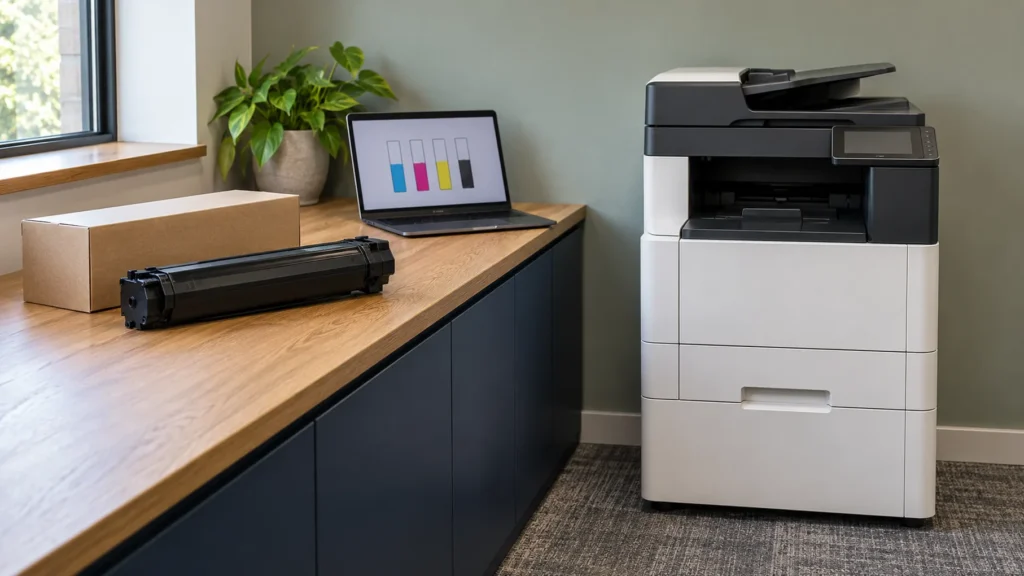
Automatic toner replenishment works because the machine tells your provider when it is running low. The software reports each cartridge's level, an alert fires as one runs low, and a replacement arrives before the old one is empty. Nobody has to watch a cupboard or raise an order.
Timing is the point. Order too early and you pay for stock that sits on a shelf; order too late and a team loses its printer for a day. Insight's print FAQs sum up the fix in four words, "the machine tells us", and that reading replaces the guesswork.
It runs in five steps:
- The device reports. It sends its toner level, page counts and any alerts to the provider.
- The alert fires. As a cartridge runs low, the provider's system raises an automatic alert.
- The replacement ships. A new cartridge goes out, timed to arrive before the old one is empty.
- You swap it. When the machine asks for the new cartridge, someone in the office changes it.
- The empty goes back. The used cartridge and its packaging are collected for recycling.
On a toner-inclusive agreement, such as our printer leasing, the cartridge carries no separate invoice because toner sits inside the agreed cost per page. That ends the two habits that make toner expensive: buying in a hurry at retail prices, and buying early to be safe. We supply genuine manufacturer toner wherever we can, which keeps print quality steady and makes toner faults far less likely.
Recycling comes with it. The same Quocirca survey found that 52% of the organisations asked use ink and toner recycling programmes. Insight collects used toner and packaging rather than leaving them for the bin.
What do print monitoring systems track?
Print monitoring systems track four things on each device: supply levels, page counts, fault and service alerts, and whether the machine is online and working. Add print management software and you also see usage by person and department. Each reading triggers a specific action, and the table below shows who takes it.
The data itself is small. Kyocera's security white paper for Fleet Services says counters, toner levels and logs go to the cloud once a day by default. That comes to about 100 kilobytes per device, less than one phone photo.
| What is tracked | What it is used for | Who acts on it |
|---|---|---|
| Toner and supply levels | Replacement toner ships before you run out | Your provider |
| Page counts (meter readings) | Billing on real page counts, with no manual reads | Your provider |
| Fault and service alerts | A remote fix, or an engineer sent with spares | Your provider's service centre |
| Device status | Problems caught before staff notice them | Your provider |
| Usage by user and department | Cost allocation, mono defaults and quotas | Your team, through print management software |
| Volumes over time | Usage reviews and right-sizing the fleet | Your account manager and you |
Is remote printer monitoring secure?
Remote printer monitoring is designed to carry device data, not documents. Manufacturers state that it sends counters, supply levels, alerts and firmware details over an encrypted connection the device opens outwards. By their own accounts, it cannot read what you print or scan. The bigger risk is a printer nobody looks after.
Konica Minolta's remote access FAQ says its remote service reads settings, counters and alerts, cannot reach the image memory or hard drive, and encrypts all its traffic. Kyocera says its fleet service does not collect, store or transmit anything in a print job.
The printer itself still needs care. The NCSC's report on enterprise connected devices warns that a compromised printer could let an attacker see everything printed or scanned in an office. It names default passwords and unpatched devices among the weaknesses attackers look for. Automated print monitoring helps with the second, because it reports each machine's firmware (its built-in software) and some platforms, Kyocera's included, can update it remotely.
Usage reports need more thought, because a report naming staff is personal data. The ICO's guidance on monitoring workers says workers must know what personal information you collect and how. Monitoring likely to be high risk also needs a data protection impact assessment (DPIA) first, so tell staff before you report printing by person. Ask any provider what leaves your network and where it is held; Insight, for its part, is certified to ISO 27001 for information security.
What changes when your fleet reports itself?
When the fleet reports itself, the admin goes and faults are dealt with sooner. Nobody orders toner, chases a meter reading or waits for someone to notice a problem, and many faults are fixed remotely before anyone is held up. Insight's published figures show the effect.
Insight's service centre in Kent resolves roughly a quarter of machine faults remotely, with no visit at all. When a visit is needed, the average response across all customers is 2.22 hours, from engineers Insight employs rather than subcontracts. Devices on Insight's managed fleets run at 99% uptime.
Billing changes too, because invoices run off the page counts each device reports, and your account manager reviews usage from the same figures. Toner goes out on need rather than guesswork, so less sits as overstock, and Insight's environmental commitments count every remote fix as an engineer journey saved.
Source: Insight Systems, published service and environmental figures.
What does automated monitoring need from you?
Automated monitoring needs three things from you: networked printers, permission for the software to send data out over an encrypted connection, and machines left switched on. Your provider sets up the software, so your part is usually a short conversation with IT.
The gaps tend to be desktop printers plugged into one computer by USB, which cannot report anything, and older machines with no built-in program. For those, a small gateway app on one networked Windows PC or server can read them over the network instead.
Mixed fleets raise one more question: does one monitoring system cover every brand, or will your team juggle a portal for each? Several of the benefits of managed print services start with monitoring, so it is worth getting right early.
Is print monitoring worth it for your office?
Automated print monitoring earns its place once you run more than a couple of networked devices, because the routine jobs it removes grow with the fleet. It pays most where machines come from different brands, where toner is bought by whoever notices first, or where nobody can say what printing costs each month.
A free print audit shows what your own fleet would report, device by device, and the findings are yours whether or not you go further. Insight's print management service includes both monitoring and automatic toner.
Frequently asked questions
No. Device monitoring reads counters, toner levels, alerts and settings, not the pages themselves. Kyocera states that its service collects nothing in a print job, and Konica Minolta says its service cannot reach the image memory. Print management software such as PaperCut does log jobs by user and department, so tell staff before you report printing by person.
Usually not much, and your provider does it. Many newer devices have a monitoring program built in that only needs switching on. Older or mixed fleets often use a small gateway app on one networked Windows PC or server. Either way, data only travels outwards over an encrypted connection, so nothing outside needs a way in through your firewall.
The same way toner does. Each device reports its own page counts to your provider, so billing runs off real figures instead of a clipboard round once a quarter. You get accurate invoices, your team gets the afternoon back, and your account manager uses the same counts in your usage reviews.
Yes. If a cartridge fails early or you need one urgently, you can order toner or report a fault through Insight's support page or by calling 0800 910 1000. Have the asset number from the device to hand, so the team can match the right machine and cartridge first time.
A free print audit records every device, its volumes, its consumable use and its age, so you can see what monitoring and automatic toner would change before you commit to anything.
Request a Free Print Audit